Introduction: When Your iMac Suddenly Stops Working
iMacs are known for their reliability, sleek design, and long lifespan — but like any electronic device, they can develop issues over time. When an iMac won’t turn on, freezes, or displays a black screen, it can disrupt your work, studies, or business operations.
In Christchurch, many customers come to IT Fixed with the same urgent concern:
“My iMac won’t turn on — is it dead?”
Fortunately, in most cases, the iMac can be repaired quickly and cost-effectively. This comprehensive guide will help you understand why your iMac may not start and why professional iMac repair in Christchurch is the safest way to fix the problem.
Common Reasons Your iMac Won’t Turn On
When an iMac fails to power up or shows no display, the issue usually falls into one of these categories:
1. Power Supply Failure (Very Common in Older iMacs)
The internal power supply unit (PSU) is responsible for delivering electricity to the rest of the system. Over time, it can fail due to:
- Age and wear
- Electrical surges
- Dust accumulation
- Faulty capacitors
Symptoms of a failing power supply:
- No lights, no sound, no startup
- Sudden power loss
- Burning smell or slight clicking noise
This is one of the most common repairs we see at IT Fixed Christchurch.
2. Faulty Logic Board
If your logic board (motherboard) fails, the iMac may:
- Turn on with no display
- Show a black screen
- Power on briefly then shut off
- Fail to boot macOS
Logic board repairs require specialist tools and diagnostics.
3. RAM or Hard Drive / SSD Failure
If your iMac powers on but does not reach the login screen, the issue may be storage or memory:
Hard Drive Failure Symptoms:
- Question mark folder
- Extremely slow booting
- Clicking or grinding noises
RAM Issues Symptoms:
- Three beeps on startup
- Black screen
- Occasional freezing
Older iMacs (2012 and earlier) are especially prone to HDD failure due to age.
4. macOS Corruption or Software Issues
Sometimes, your iMac hardware is fine — but macOS has crashed.
Symptoms:
- White or black loading screen
- Stuck on Apple logo
- Endless reboot loop
This often requires macOS repair or reinstallation.
5. Bad Peripherals or Faulty Power Cable
You’d be surprised how many “dead” iMacs come in because of:
- A faulty power cord
- A shorted power connector
- A damaged external drive preventing boot
At IT Fixed, external devices are always checked first to avoid unnecessary repair costs.
Quick Troubleshooting Steps You Can Try at Home
Before bringing your iMac in for repair, try these safe steps.
⚠ If you hear burning, popping, or smell smoke — DO NOT turn the iMac on again.
1. Check the Power Cable & Outlet
Try a different power outlet or cable. Many customers in Christchurch suburbs (like Hornby & Riccarton) experience power fluctuations.
2. Reset the SMC (Intel iMac Only)
Shut down → unplug for 20 seconds → plug back in → turn on.
3. Disconnect All External Devices
Remove USB drives, external HDDs, printers, and hubs.
4. Boot Into Safe Mode
Hold Shift while powering on (Intel models).
On M1/M2 iMacs, hold the power button until options appear.
5. Try NVRAM / PRAM Reset (Intel Models)
Hold Option + Command + P + R for 20 seconds.
If none of these work, the issue is likely hardware-related.
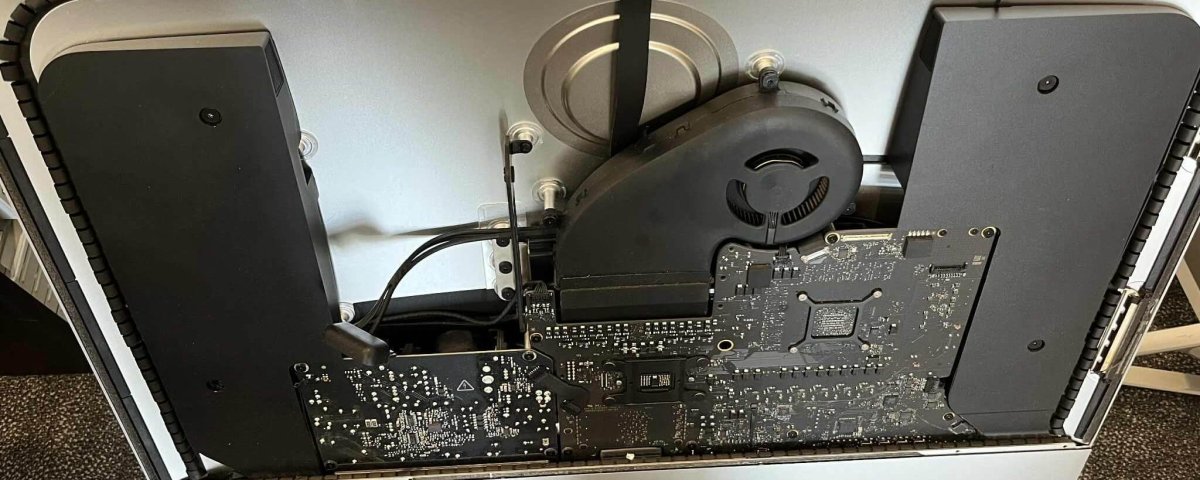
Why DIY iMac Repair Is Dangerous
iMacs contain:
- High-voltage components
- Delicate T-con boards
- Pressurised LCD screens
- Internal power supplies
Opening an iMac without proper tools can cause:
❌ Screen cracking (very common)
❌ Electric shock
❌ Permanent damage to connectors
❌ More expensive repairs later
Most customers who try DIY repairs bring their iMac to IT Fixed after things get worse — so it’s always safer to let a professional handle it.
Professional iMac Repair Process at IT Fixed Christchurch
At IT Fixed, we follow a detailed diagnostic process to ensure your iMac is repaired correctly the first time.
1. Full Hardware Diagnostics
We test:
- Power supply
- Logic board
- RAM
- SSD/HDD
- GPU
- Temperature sensors
- Power cables and connectors
This ensures we identify the exact fault before starting repairs.
2. iMac Screen Removal with Professional Tools
We use specialist iMac screen removal equipment to avoid cracking or damage.
3. Component Testing
Each part is tested individually:
- Power supply voltage
- Logic board response
- Memory integrity
- Drive health
4. High-Quality Replacement Parts
We only use:
- Premium OEM-grade power supplies
- High-quality SSDs
- Genuine-spec components
No cheap or risky parts.
5. Software Repair & macOS Optimisation
If macOS is corrupted, we:
- Repair the OS
- Reinstall macOS
- Optimise performance
- Ensure smooth booting
6. Final Testing & Quality Assurance
Your iMac is tested under load to ensure reliability.
Why Christchurch Customers Choose IT Fixed
Here’s why IT Fixed is the leading choice for iMac repair Christchurch:
⭐ Apple-Experienced Technicians
Years of hands-on experience with all iMac models.
⭐ Fast Turnaround
Most repairs completed in 24–48 hours.
⭐ Transparent Pricing
Clear quotes — no hidden fees.
⭐ Local Experts
Trusted by customers across Christchurch, including:
- Riccarton
- Papanui
- Addington
- Sydenham
- Rolleston
- Hornby
- Christchurch CBD
⭐ Data-Safe Repairs
We take precautions to protect your files during repairs.
Christchurch Examples: Real Customer Cases
Case 1: Riccarton — iMac No Power
A 2015 27-inch iMac wouldn’t turn on.
Cause: Dead power supply
Fix: Replaced PSU + cleaned dust → working perfectly.
Case 2: Sydenham — iMac Stuck on Apple Logo
Cause: Failing HDD
Fix: Installed SSD + fresh macOS → tripled speed.
Case 3: Papanui — Black Screen, Fan Max Speed
Cause: Logic board sensor failure
Fix: Replaced sensor cable + performed thermal service.
iMac Repair Costs in Christchurch (Typical Guide)
| Issue | Estimated Price |
|---|---|
| Power Supply Replacement | $457–$670 excluding GST |
| SSD Upgrade | $357–$657 excluding GST |
| Logic Board Repair | $600–$1000 excluding GST |
| macOS Repair/Reinstall | $197–$257 |
| iMac Diagnostics | Low fixed fee |
(Prices vary by model & parts.)
Frequently Asked Questions (FAQs)
1. Can you repair all iMac models?
Yes — from 2010 to the latest released models.
2. How long does an iMac repair take?
Most repairs take 24–48 hours.
3. Will I lose my data?
We take all precautions to preserve your data.
4. Do you offer SSD upgrades?
Yes — one of the most common upgrades in Christchurch.
5. My iMac turns on but shows no display — can it be fixed?
Yes, this could be PSU, GPU, or T-con related.
6. Do you offer mobile or onsite repairs?
Drop-off is recommended for accuracy.
7. Do you repair water-damaged iMacs?
Yes, depending on corrosion and part availability.
8. What’s the diagnostic fee?
Low fixed cost, waived if you proceed with repair.
9. Do you guarantee your repairs?
Yes — all work is covered by warranty.
10. My iMac is very old — is repair worth it?
Often yes — especially if upgraded to SSD.
Call to Action
📞 Call IT Fixed Christchurch: 03 978 0749
🌐 Visit: itfixed.co.nz
📍 Convenient Christchurch Location — Fast Turnaround & Trusted Service