Introduction: Water Damage Is a Mac Emergency — Act Fast
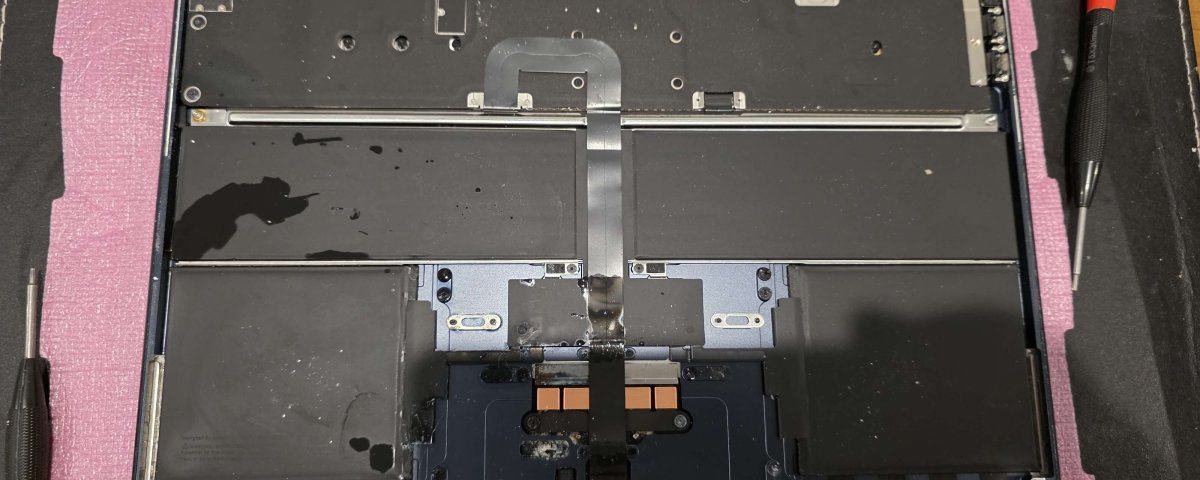
A water-damaged MacBook or iMac is one of the most urgent repair situations a device owner can face. Whether it’s coffee, tea, juice, or full water exposure, liquid can quickly reach the logic board, keyboard, battery, and internal circuits, causing permanent damage if not treated immediately.
At IT Fixed Computer Repair Christchurch, we specialise in MacBook water damage repair and iMac liquid damage recovery services, helping customers across Christchurch recover both their device and their important data.
The key with liquid damage is simple:
👉 The faster you act, the higher the chance of saving your Mac and your data.
⚠️ What Happens When Liquid Enters a Mac?
MacBooks and iMacs are not waterproof. Once liquid enters the system, it can cause:
- Short circuits on the logic board
- Keyboard failure or random key inputs
- Battery corrosion or swelling
- Screen flickering or black display
- Trackpad malfunction
- Sudden power failure
Even if your Mac still turns on after liquid exposure, damage is often still happening inside silently.
🚨 What to Do Immediately After Water Damage
If your MacBook or iMac gets wet, follow these steps immediately:
1. Power OFF immediately
Do NOT try to “check if it still works.” This is the most common mistake.
2. Unplug everything
Disconnect chargers, USB devices, external drives, and accessories.
3. Do NOT turn it back on
Turning it on can cause short circuits and permanent logic board failure.
4. Do NOT use rice or heat
These methods are outdated and can make damage worse.
5. Contact a professional repair service
Bring it to IT Fixed Computer Repair Christchurch as soon as possible.
👉 https://www.itfixed.co.nz/mac-repair-christchurch/
🔧 IT Fixed Water Damage Repair Process
At IT Fixed, we follow a professional multi-stage liquid damage recovery process designed to maximise repair success.
1. Full Diagnostic Assessment
We inspect internal components to identify all liquid-affected areas.
2. Deep Internal Cleaning
We clean corrosion using professional-grade cleaning solutions and ultrasonic techniques where required.
3. Component-Level Inspection
We test critical components including:
- Logic board
- Battery
- Keyboard
- Trackpad
- Display connectors
4. Repair or Replacement of Damaged Parts
If needed, we replace:
- Battery
- Keyboard
- Logic board components
- Screen connectors
5. Data Recovery Services
If your Mac cannot be powered on, we attempt data recovery to save your files, photos, and documents.
👉 https://www.itfixed.co.nz/data-recovery-christchurch/
6. Full Testing & Restoration
We ensure your Mac is stable, safe, and fully functional before return.
💾 Data Recovery: Saving Your Important Files
One of the biggest concerns after liquid damage is data loss.
At IT Fixed Christchurch, we prioritise data recovery wherever possible, including:
- Business documents
- University files
- Photos and videos
- Emails and application data
Even if your Mac cannot be repaired fully, data recovery may still be possible from the storage drive or logic board.
🧠 Common Signs of Water Damage in MacBooks
Not all liquid damage is immediately visible. Watch for:
- Keyboard not responding
- Random shutdowns
- Screen flickering or dim display
- Fan running loudly
- Trackpad not clicking
- Mac not turning on at all
If you notice any of these, you likely need MacBook liquid damage repair in Christchurch immediately.
🏆 Why Choose IT Fixed Computer Repair Christchurch?
Choosing the right repair specialist is critical for water damage recovery.
✔ Apple-Experienced Technicians
We specialise in MacBook and iMac repair systems, not general electronics.
✔ Fast Emergency Repairs
Water damage is time-sensitive — we prioritise urgent cases.
✔ Advanced Cleaning & Repair Methods
We use professional cleaning and diagnostic tools to improve recovery success.
✔ Data Recovery Focus
We prioritise saving your important files first.
✔ Transparent Pricing
No hidden costs — full quote before repair begins.
✔ Local Christchurch Service
Trusted by students, professionals, and businesses across Christchurch.
⏱ How Long Does Water Damage Repair Take?
Repair time depends on severity:
- Minor liquid exposure: 24 hours
- Moderate damage: 3–5 hours
- Severe logic board damage: 5–7 days (or longer if parts needed)
We always aim for fast turnaround without compromising quality.
💰 Cost of Water Damage Repair in Christchurch
Pricing depends on:
- Level of liquid exposure
- Damaged components
- Data recovery requirements
- Model of MacBook or iMac
We always provide:
- Free diagnostic assessment
- Clear upfront pricing
- No hidden fees
🛡 How to Prevent Future Liquid Damage
Protect your Mac with simple habits:
- Keep drinks away from workspace
- Use spill-proof bottles
- Avoid working near water sources
- Use a protective keyboard cover
- Shut down device during travel
Prevention is always cheaper than repair.
❓ FAQs: MacBook Water Damage Repair Christchurch
Can a water-damaged MacBook be repaired?
Yes, many MacBooks can be fully repaired if treated quickly.
How long does recovery take?
Most repairs take 24–48 hours, depending on severity.
Is my data safe after liquid damage?
Often yes — we prioritise data recovery during repair.
Should I try turning it on after water damage?
No. This can cause permanent damage.
Do you repair all Mac models?
Yes, we repair all MacBook Air, MacBook Pro, and iMac models.
📍 Local Christchurch Mac Repair Experts
IT Fixed Computer Repair is a trusted Christchurch computer repair service specialising in:
- MacBook screen repair Christchurch
- MacBook battery replacement
- iMac repair services
- Laptop water damage repair
- Data recovery Christchurch
We are your local Apple repair specialists in Christchurch.
📞 Call to Action – Emergency Mac Water Damage Repair
If your Mac has suffered liquid damage, act fast.
📞 Call IT Fixed Computer Repair: 03 978 0749
🌐 Visit: https://itfixed.co.nz
Fast, reliable, and professional MacBook water damage repair Christchurch services designed to save your device and your data.